

Overview
Reports allow you to chain multiple metrics together to create comprehensive analytics dashboards. Track trends, compare performance, and drill down into specific calls - all from a single view.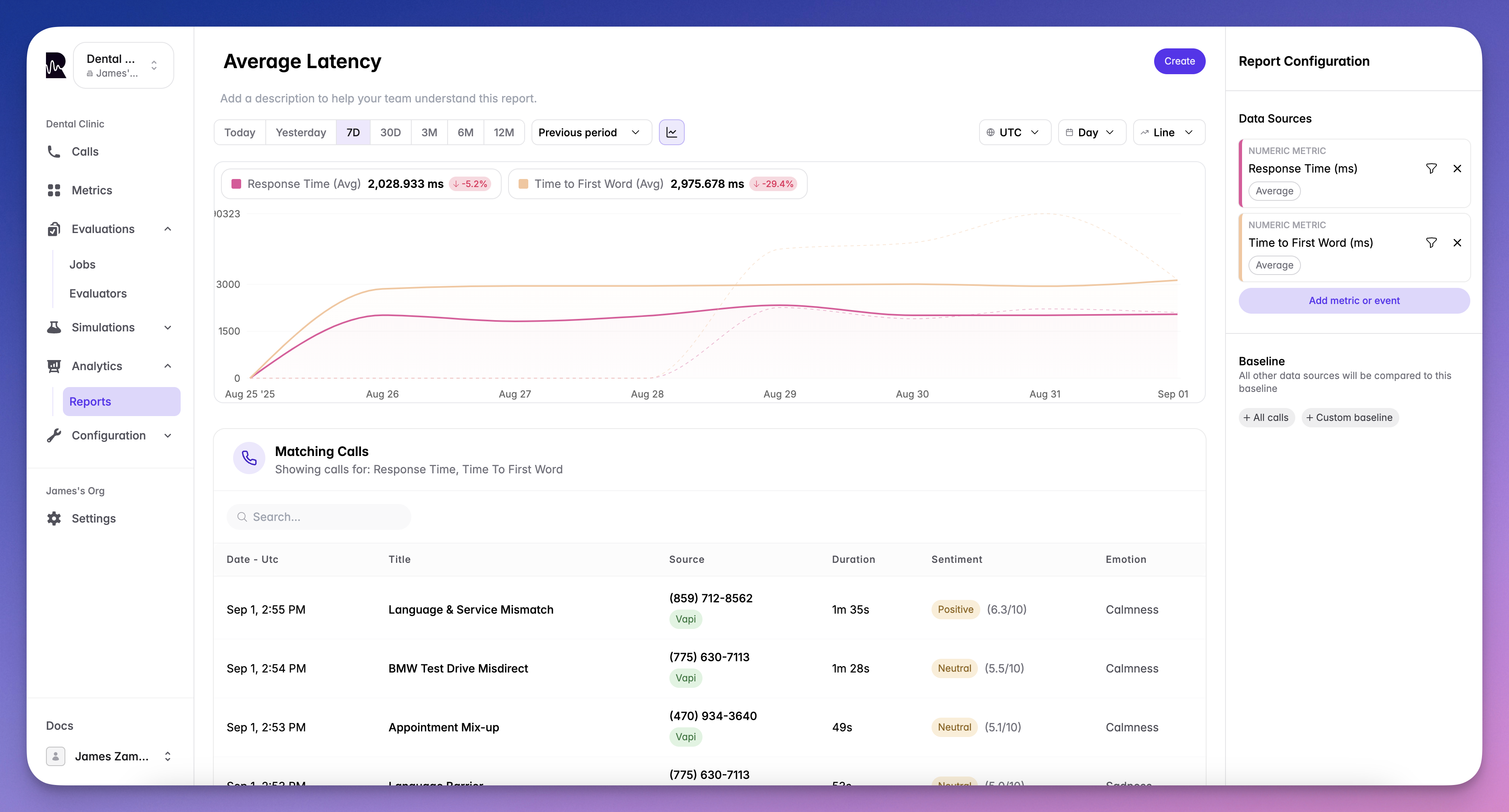
What You Can Report On
Events
Track occurrences of specific events in your system:evaluation_failed- When calls fail quality checkstask_completed- Successful objective completionescalation_triggered- Customer requested human agenttool_call_failed- Function execution errors- Custom events defined in your system
Metrics
Analyze performance indicators over time:response_time- Agent response latencysentiment_score- Customer satisfaction trendsinterruption_count- Conversation flow issuescall_duration- Efficiency metrics- Any custom metrics you’ve defined
- Count - Total number of occurrences
- Average - Mean value across calls
- Sum - Total combined value
- Minimum - Lowest recorded value
- Maximum - Highest recorded value
- Median - Middle value (50th percentile)
- P90 - 90th percentile value
- P95 - 95th percentile value
Baseline Configuration
Set context for your data with flexible baseline options:- Percentage Baseline
- Custom Baseline
- Sum Baseline
View data as a percentage against all your calls:
Visualization Options
Line Graph
Track trends over time with detailed line charts:- Identifying patterns and trends
- Comparing multiple metrics
- Spotting anomalies
Number Chart
Display key metrics as single values or comparisons: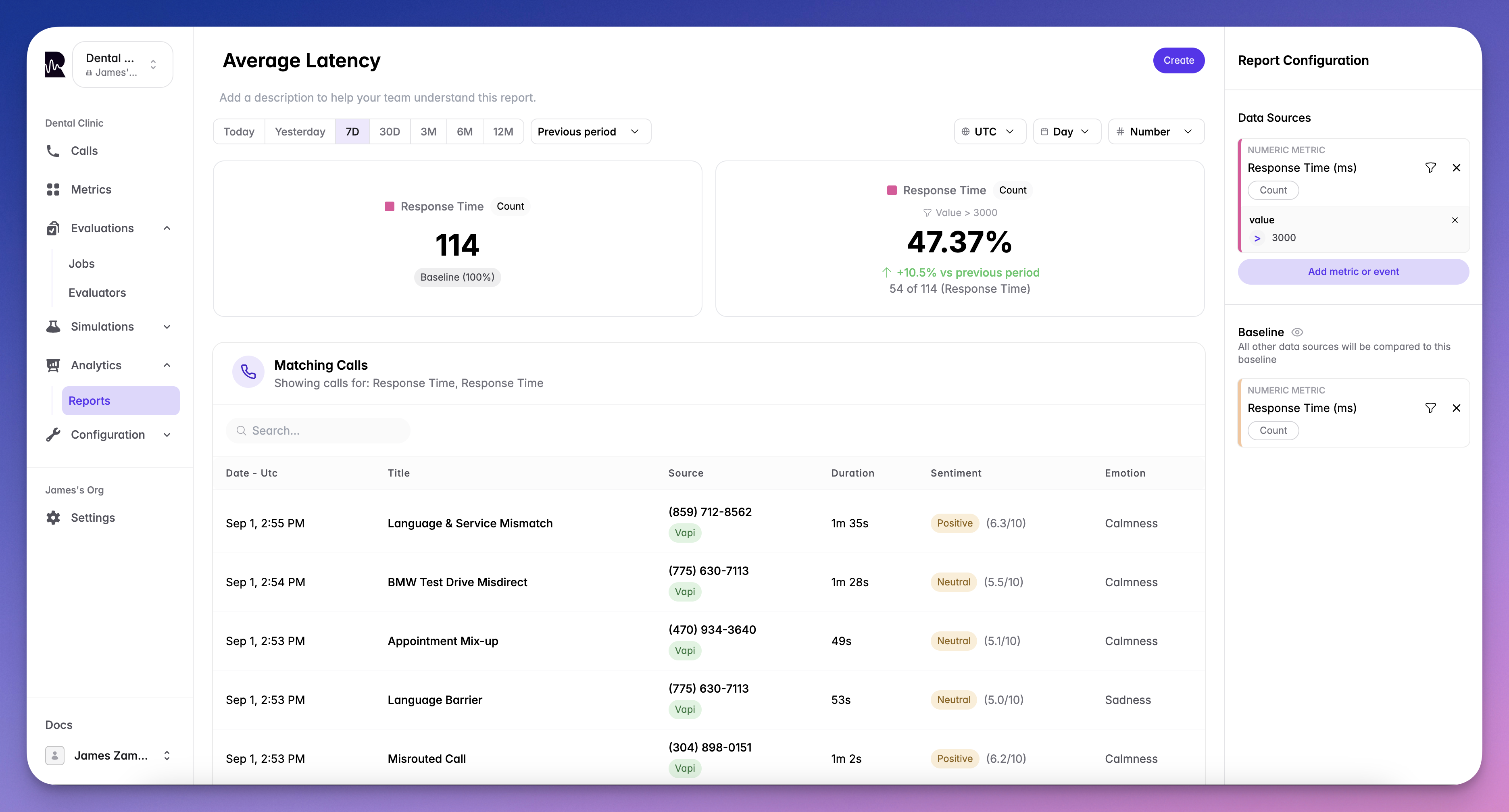
- Executive dashboards
- Quick status checks
- KPI monitoring
Time Controls
Customize your view with flexible time options:Time Period
- Last 24 hours
- Last 7 days
- Last 30 days
- Last 90 days
- Custom date range
Interval Grouping
- Hour: For real-time monitoring
- Day: For daily trends
- Week: For weekly patterns
- Month: For long-term analysis
- Year: For annual comparisons
Chain Multiple Metrics
Create powerful insights by combining metrics:Correlation Analysis
Compare response_time with sentiment_score to find relationships
Compound Metrics
Stack multiple metrics to see the complete picture
Event + Metric
Combine events with metrics for context (e.g., response_time when evaluation_failed)
Sequential Analysis
Track how one metric affects another over time
Drill-Down to Calls
Every data point connects to the actual conversations:- Click any data point on your report
- View matching calls that contributed to that metric
- Navigate directly to the call screen from Live Monitoring
- Analyze the conversation with full transcript and analysis
Use Cases
Performance Tracking
Monitor agent efficiency and quality:- Average response times by agent
- Task completion rates over time
- Customer satisfaction trends
Issue Detection
Identify problems before they escalate:- Spike in failed evaluations
- Increase in customer frustration
- Pattern of tool failures
Business Intelligence
Track metrics that matter to your business:- Conversion rates
- Average handle time
- Cost per successful interaction
Compliance Monitoring
Ensure adherence to standards:- Script compliance percentage
- Required disclosure rates
- Quality score distributions
What’s Next
Dashboards
Organize multiple reports into a single view
Live Monitoring
Monitor calls in real-time