

Overview
API keys authenticate your requests to Roark’s API, enabling secure access to monitoring, testing, and analytics features.API keys are essential for all integrations - whether you’re using our SDKs, webhooks, or direct API calls.
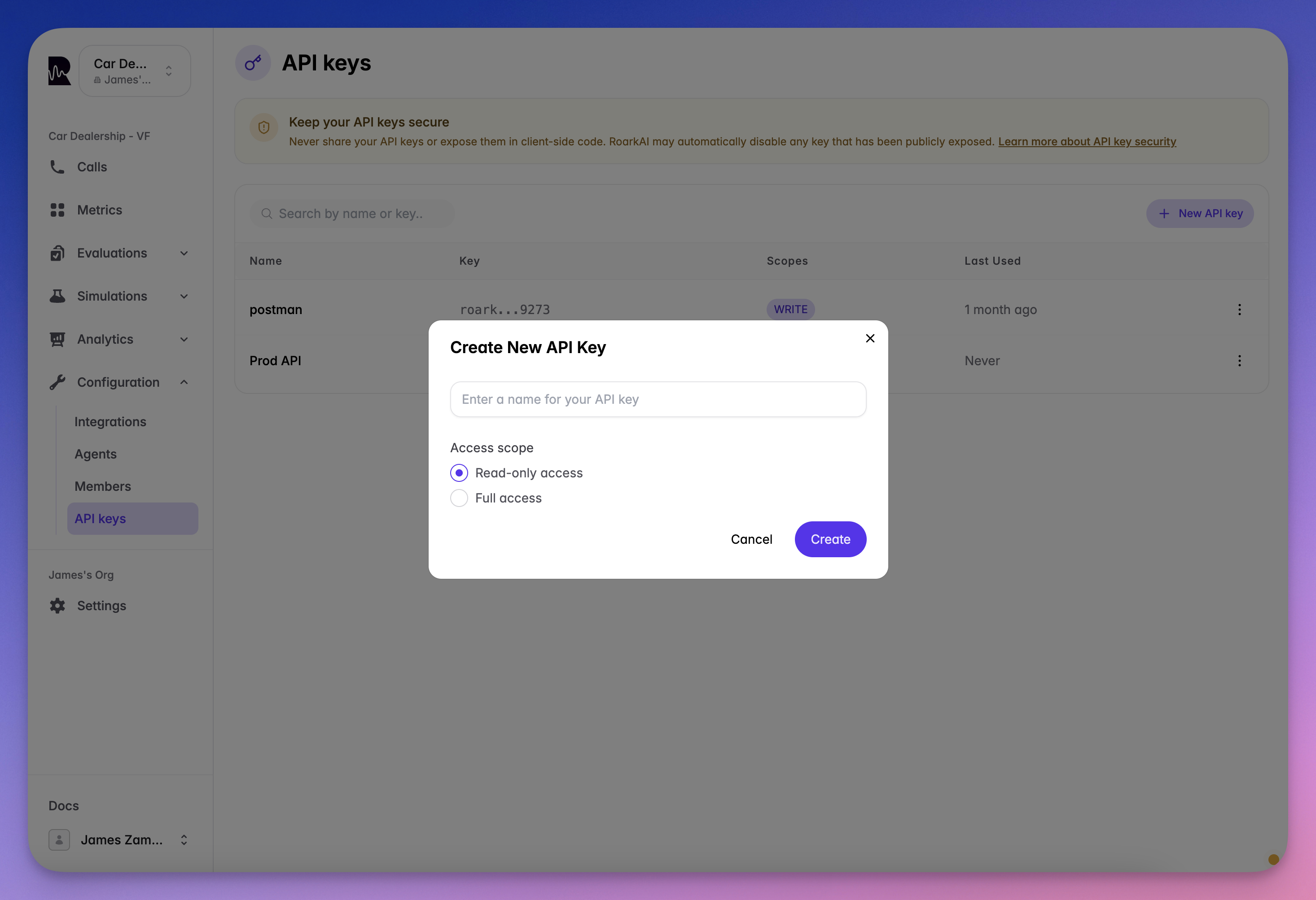
Generating an API Key
1
Navigate to API Keys
Go to the API Keys section in your dashboard
2
Create New Key
Click the “Create API Key” button
3
Set Permissions
Choose your access level:
- Read-Only: Retrieve data only
- Full Access: Read and write operations
4
Save Securely
Copy and store your key immediately - it won’t be shown again
Using Your API Key
All API requests require authentication via the Authorization header:Security Best Practices
Environment Variables
Store keys in
.env files or secure vaults, never hardcode themRegular Rotation
Regenerate keys periodically to maintain security
Least Privilege
Use read-only keys when write access isn’t needed
Monitor Usage
Check last-used timestamps to detect unauthorized access
Common Integration Patterns
- SDK Integration
- CI/CD Pipeline
Initialize SDKs with your key:
Need Help?
API Reference
Explore all available endpoints and parameters
Integration Guides
Step-by-step platform integration tutorials