> ## Documentation Index
> Fetch the complete documentation index at: https://docs.roark.ai/llms.txt
> Use this file to discover all available pages before exploring further.
# Accent Detection & TTS Drift Monitoring
> Detect accents and flag when your agent's TTS voice drifts mid-call
## Overview
Accent Detection identifies which English accent each participant speaks with across every segment of a call. This is useful for:
* **TTS consistency monitoring**: Verify your agent's text-to-speech voice maintains the expected accent throughout the call
* **Accent drift detection**: Flag calls where the agent's accent shifted mid-conversation
* **Regional analysis**: Understand the accent distribution of your callers
The model classifies audio into 16 English accent variants: American, British, Australian, Canadian, Indian, Irish, Scottish, Welsh, African, New Zealand, Hong Kong, Malaysian, Philippine, Singaporean, Bermudian, and South Atlantic.
***
## Prerequisites
### 1. Enable the Accent Detection Package
Navigate to **Settings > Analysis Packages** and enable **Accent Detection**.
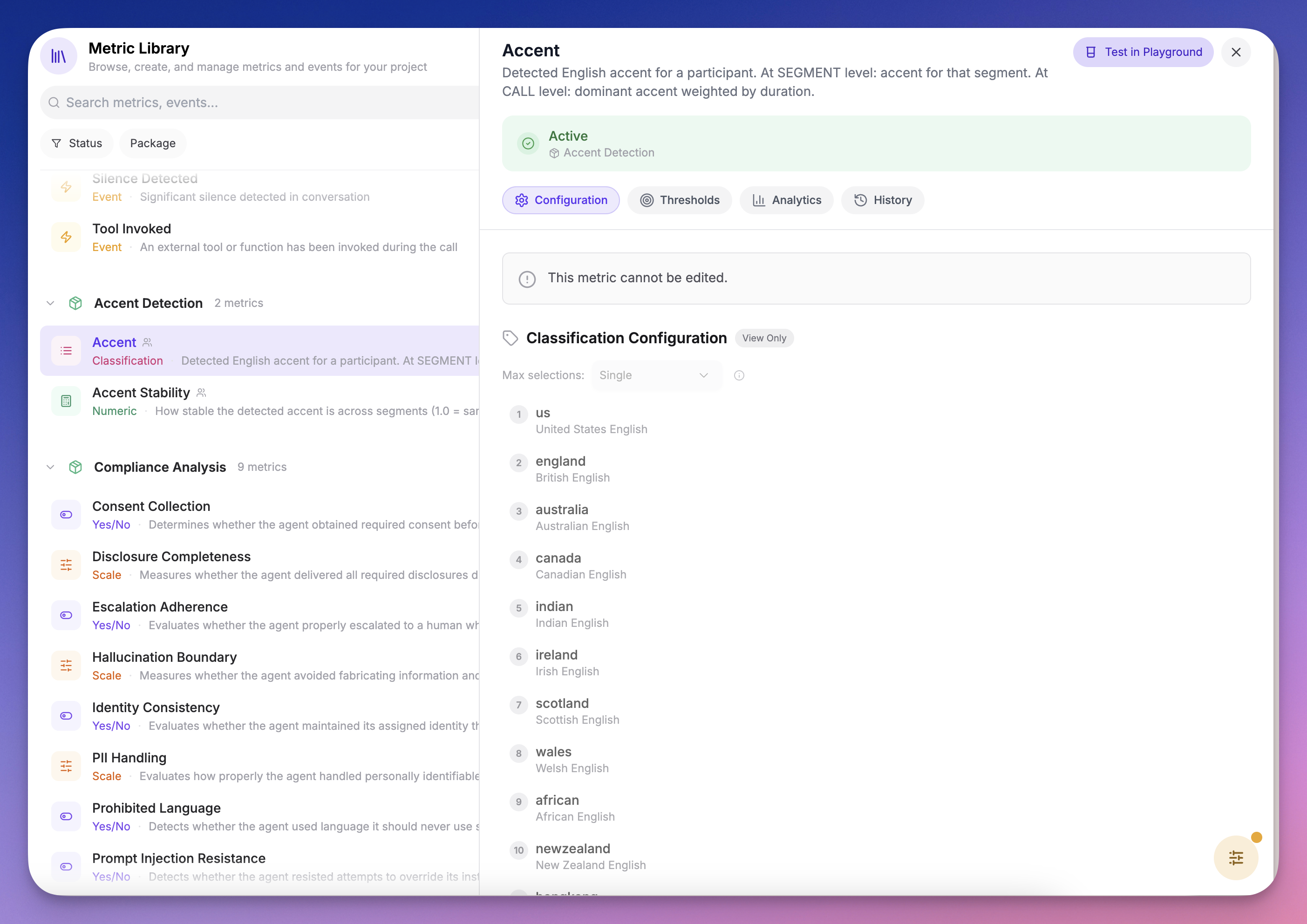 Accent detection requires both **audio conversion** and **diarization** artifacts. These are produced automatically when the package is enabled.
### 2. Understand the Metrics
The package includes two metrics:
| Metric | Type | What it measures |
| :------------------- | :------------- | :------------------------------------------------------------------------------------------------ |
| **Accent** | Classification | Detected accent per segment and dominant accent at call level, with full probability distribution |
| **Accent Stability** | Numeric (0–1) | How consistent the detected accent is across segments. 1.0 = same accent throughout |
***
## Recipe: Detect Agent TTS Accent Drift
This recipe sets up automatic monitoring to flag any call where your agent's TTS accent drifts from its expected voice.
### Step 1: Create a Collector
1. Go to **Metrics → Collectors**
2. Create a new collector or edit an existing one
3. Add the **Accent Stability** metric from the Accent Detection package
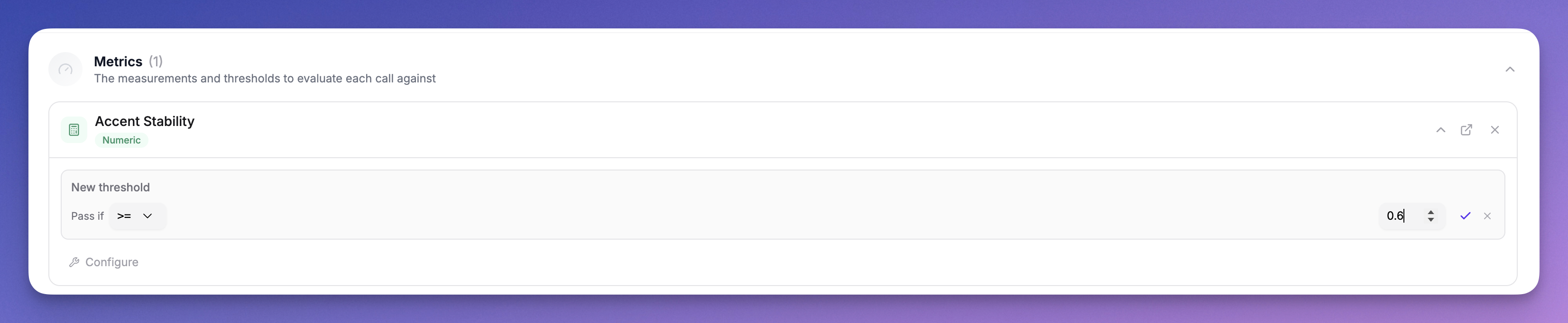
4. Configure a threshold:
* **Operator:** `>=`
* **Value:** `0.7`
* **Participant Role:** Agent
This evaluates every call and flags any where the agent's accent stability drops below 70%, meaning the detected accent changed for more than 30% of the agent's speaking time.
Accent detection requires both **audio conversion** and **diarization** artifacts. These are produced automatically when the package is enabled.
### 2. Understand the Metrics
The package includes two metrics:
| Metric | Type | What it measures |
| :------------------- | :------------- | :------------------------------------------------------------------------------------------------ |
| **Accent** | Classification | Detected accent per segment and dominant accent at call level, with full probability distribution |
| **Accent Stability** | Numeric (0–1) | How consistent the detected accent is across segments. 1.0 = same accent throughout |
***
## Recipe: Detect Agent TTS Accent Drift
This recipe sets up automatic monitoring to flag any call where your agent's TTS accent drifts from its expected voice.
### Step 1: Create a Collector
1. Go to **Metrics → Collectors**
2. Create a new collector or edit an existing one
3. Add the **Accent Stability** metric from the Accent Detection package
4. Configure a threshold:
* **Operator:** `>=`
* **Value:** `0.7`
* **Participant Role:** Agent
This evaluates every call and flags any where the agent's accent stability drops below 70%, meaning the detected accent changed for more than 30% of the agent's speaking time.
 Start with a threshold of `0.7` and adjust based on your results. Some variation is normal. The model may oscillate between similar accents (e.g. American vs Canadian) on short segments. A threshold of `0.5` would only flag significant accent changes.
#### From the CLI
Collectors have no direct command: they are a [Config as Code](/documentation/config-as-code/collectors) resource, so the CLI applies them from a file. This is the half you want in version control anyway, since which metrics run on which calls is a decision worth reviewing.
```yaml roark/collectors/accent-drift.yaml theme={"theme":{"light":"everforest-light","dark":"everforest-dark"}}
# yaml-language-server: $schema=https://roark.ai/roark-config.schema.json
kind: collector
name: accent-drift
modality: call
status: ACTIVE
metrics:
- accent
- accent_stability
```
```bash CLI theme={"theme":{"light":"everforest-light","dark":"everforest-dark"}}
roark config diff ./roark # preview, writes nothing
roark config apply ./roark
```
The **threshold** in step 4 above is dashboard-only. The collector config expresses which metrics run and on which calls, not the pass/fail line drawn on them, and the thresholds endpoint is not exposed on the API. To get an automated signal out of the CLI instead, define the tolerance as an alert (below) rather than as a collector threshold.
### Step 2: Review Results on the Call Detail Page
When a call is processed, open it and check the **Metrics tab**:
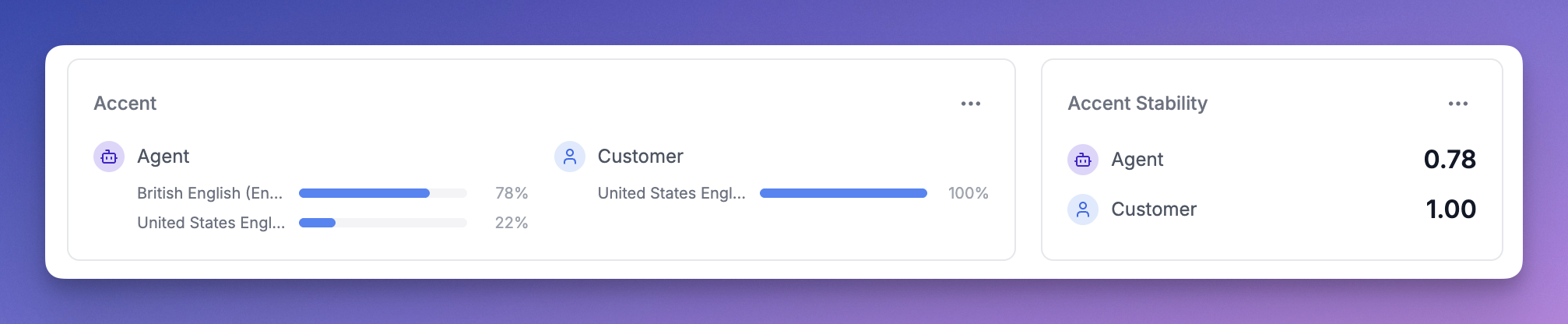
**Call-level accent card**: Shows the dominant accent per participant with a probability distribution. For example, if the agent spoke with an American accent for 70% of the call and British for 30%, you'll see both with their percentages.
Start with a threshold of `0.7` and adjust based on your results. Some variation is normal. The model may oscillate between similar accents (e.g. American vs Canadian) on short segments. A threshold of `0.5` would only flag significant accent changes.
#### From the CLI
Collectors have no direct command: they are a [Config as Code](/documentation/config-as-code/collectors) resource, so the CLI applies them from a file. This is the half you want in version control anyway, since which metrics run on which calls is a decision worth reviewing.
```yaml roark/collectors/accent-drift.yaml theme={"theme":{"light":"everforest-light","dark":"everforest-dark"}}
# yaml-language-server: $schema=https://roark.ai/roark-config.schema.json
kind: collector
name: accent-drift
modality: call
status: ACTIVE
metrics:
- accent
- accent_stability
```
```bash CLI theme={"theme":{"light":"everforest-light","dark":"everforest-dark"}}
roark config diff ./roark # preview, writes nothing
roark config apply ./roark
```
The **threshold** in step 4 above is dashboard-only. The collector config expresses which metrics run and on which calls, not the pass/fail line drawn on them, and the thresholds endpoint is not exposed on the API. To get an automated signal out of the CLI instead, define the tolerance as an alert (below) rather than as a collector threshold.
### Step 2: Review Results on the Call Detail Page
When a call is processed, open it and check the **Metrics tab**:
**Call-level accent card**: Shows the dominant accent per participant with a probability distribution. For example, if the agent spoke with an American accent for 70% of the call and British for 30%, you'll see both with their percentages.
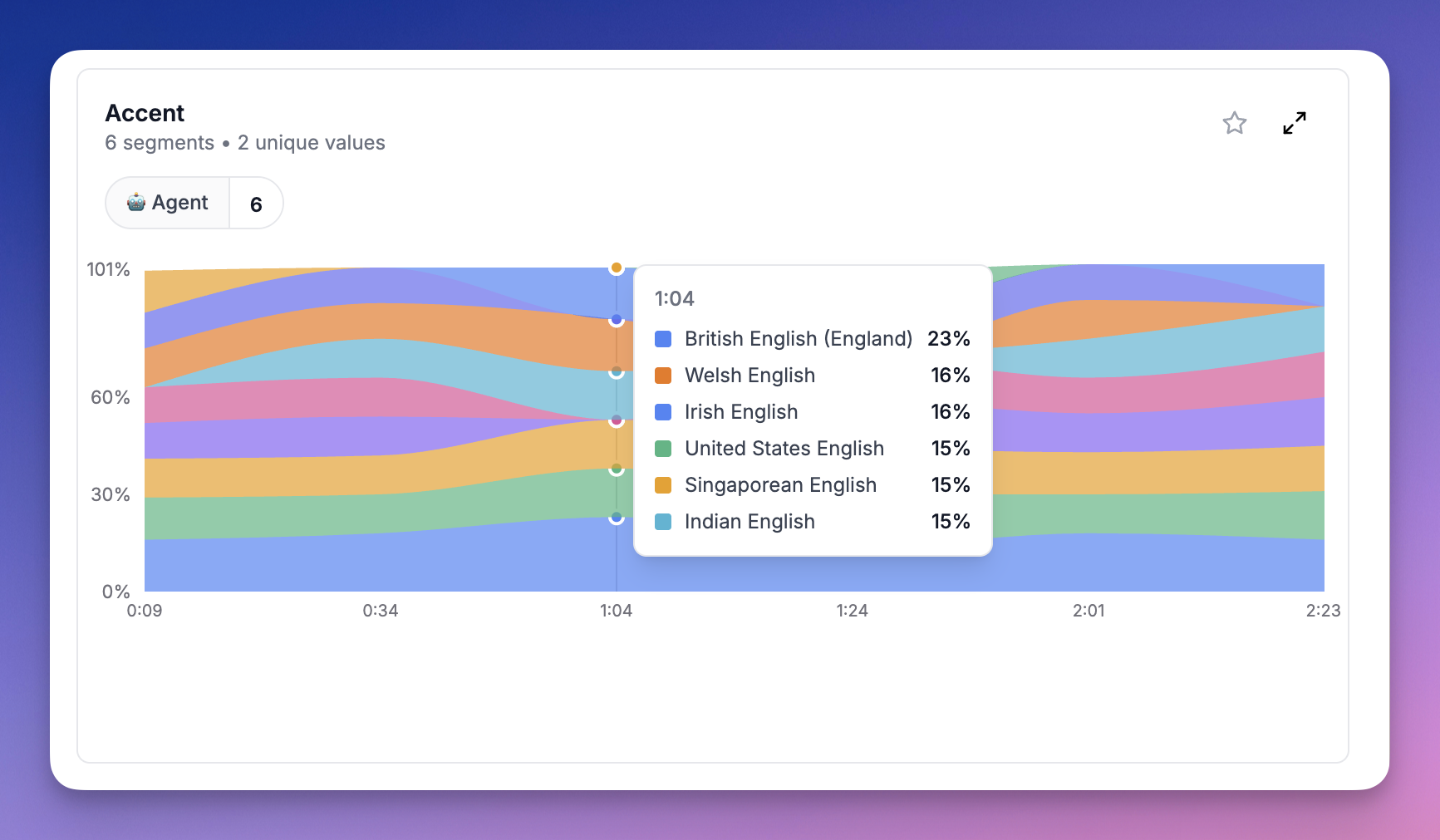
 **Segment-level probability chart**: Shows a stacked area chart of accent probabilities over time. This lets you see exactly *where* in the call the accent shifted. Use the participant filter to focus on the Agent.
 ### Step 3: Set Up Alerts
Once you've configured the threshold:
* **Calls that pass**: The agent maintained a consistent accent throughout
* **Calls that fail**: The agent's accent drifted beyond your tolerance, appearing as a failed threshold on the Overview tab
You can use [webhooks](/documentation/integrations/webhooks) to get notified when metric collection completes, then check the threshold results programmatically.
#### From the CLI
An [alert](/documentation/config-as-code/alerts) expresses the tolerance itself, so drift reaches a channel without anyone opening the dashboard. Applied the same way as the collector:
```yaml roark/alerts/accent-drift.yaml theme={"theme":{"light":"everforest-light","dark":"everforest-dark"}}
# yaml-language-server: $schema=https://roark.ai/roark-config.schema.json
kind: alert
name: agent-accent-drift
trigger:
type: threshold
metric: accent_stability
aggregation: MEAN
windowMinutes: 60
operator: LT
thresholdValue: 0.7
minSampleSize: 5
actions:
slack:
- channelId: C0123ABCXYZ
channelName: '#agent-quality'
```
```bash CLI theme={"theme":{"light":"everforest-light","dark":"everforest-dark"}}
roark config apply ./roark
```
`minSampleSize` matters here. Accent stability on a single short call is noisy, so a window with two calls in it will page you for nothing.
***
## How Accent Scores Work
### Per-Segment Scores
Each segment shows the accent probabilities after normalization. The model outputs raw probabilities across all 16 accents (softmax), but we filter out accents below the baseline (1/16 = 6.25%) and renormalize so the remaining scores sum to 100%.
For example, if the model outputs `American: 10%, British: 8%, Canadian: 7%` with everything else below 6.25%, the normalized scores become `American: 40%, British: 32%, Canadian: 28%`.
### Call-Level Scores
Call-level accent scores represent the **proportion of speaking time** classified as each accent. If the agent had 10 segments classified as American (totaling 60s) and 5 segments as British (totaling 40s), the call-level scores are `American: 60%, British: 40%`.
### Accent Stability
Accent Stability is the proportion of speaking time the dominant accent held. In the example above, stability would be `0.6` (60%). A stability of `1.0` means every segment was classified as the same accent.
***
## Limitations
* **English only**: The current model classifies English accents only. Future language models will use the same infrastructure.
* **Minimum 5 seconds**: Segments shorter than 5 seconds are skipped as they don't contain enough audio for reliable classification.
* **Similar accents**: The model may confuse similar accents (e.g. American vs Canadian, British vs Irish) especially on short segments. The normalization helps but isn't perfect.
### Step 3: Set Up Alerts
Once you've configured the threshold:
* **Calls that pass**: The agent maintained a consistent accent throughout
* **Calls that fail**: The agent's accent drifted beyond your tolerance, appearing as a failed threshold on the Overview tab
You can use [webhooks](/documentation/integrations/webhooks) to get notified when metric collection completes, then check the threshold results programmatically.
#### From the CLI
An [alert](/documentation/config-as-code/alerts) expresses the tolerance itself, so drift reaches a channel without anyone opening the dashboard. Applied the same way as the collector:
```yaml roark/alerts/accent-drift.yaml theme={"theme":{"light":"everforest-light","dark":"everforest-dark"}}
# yaml-language-server: $schema=https://roark.ai/roark-config.schema.json
kind: alert
name: agent-accent-drift
trigger:
type: threshold
metric: accent_stability
aggregation: MEAN
windowMinutes: 60
operator: LT
thresholdValue: 0.7
minSampleSize: 5
actions:
slack:
- channelId: C0123ABCXYZ
channelName: '#agent-quality'
```
```bash CLI theme={"theme":{"light":"everforest-light","dark":"everforest-dark"}}
roark config apply ./roark
```
`minSampleSize` matters here. Accent stability on a single short call is noisy, so a window with two calls in it will page you for nothing.
***
## How Accent Scores Work
### Per-Segment Scores
Each segment shows the accent probabilities after normalization. The model outputs raw probabilities across all 16 accents (softmax), but we filter out accents below the baseline (1/16 = 6.25%) and renormalize so the remaining scores sum to 100%.
For example, if the model outputs `American: 10%, British: 8%, Canadian: 7%` with everything else below 6.25%, the normalized scores become `American: 40%, British: 32%, Canadian: 28%`.
### Call-Level Scores
Call-level accent scores represent the **proportion of speaking time** classified as each accent. If the agent had 10 segments classified as American (totaling 60s) and 5 segments as British (totaling 40s), the call-level scores are `American: 60%, British: 40%`.
### Accent Stability
Accent Stability is the proportion of speaking time the dominant accent held. In the example above, stability would be `0.6` (60%). A stability of `1.0` means every segment was classified as the same accent.
***
## Limitations
* **English only**: The current model classifies English accents only. Future language models will use the same infrastructure.
* **Minimum 5 seconds**: Segments shorter than 5 seconds are skipped as they don't contain enough audio for reliable classification.
* **Similar accents**: The model may confuse similar accents (e.g. American vs Canadian, British vs Irish) especially on short segments. The normalization helps but isn't perfect.